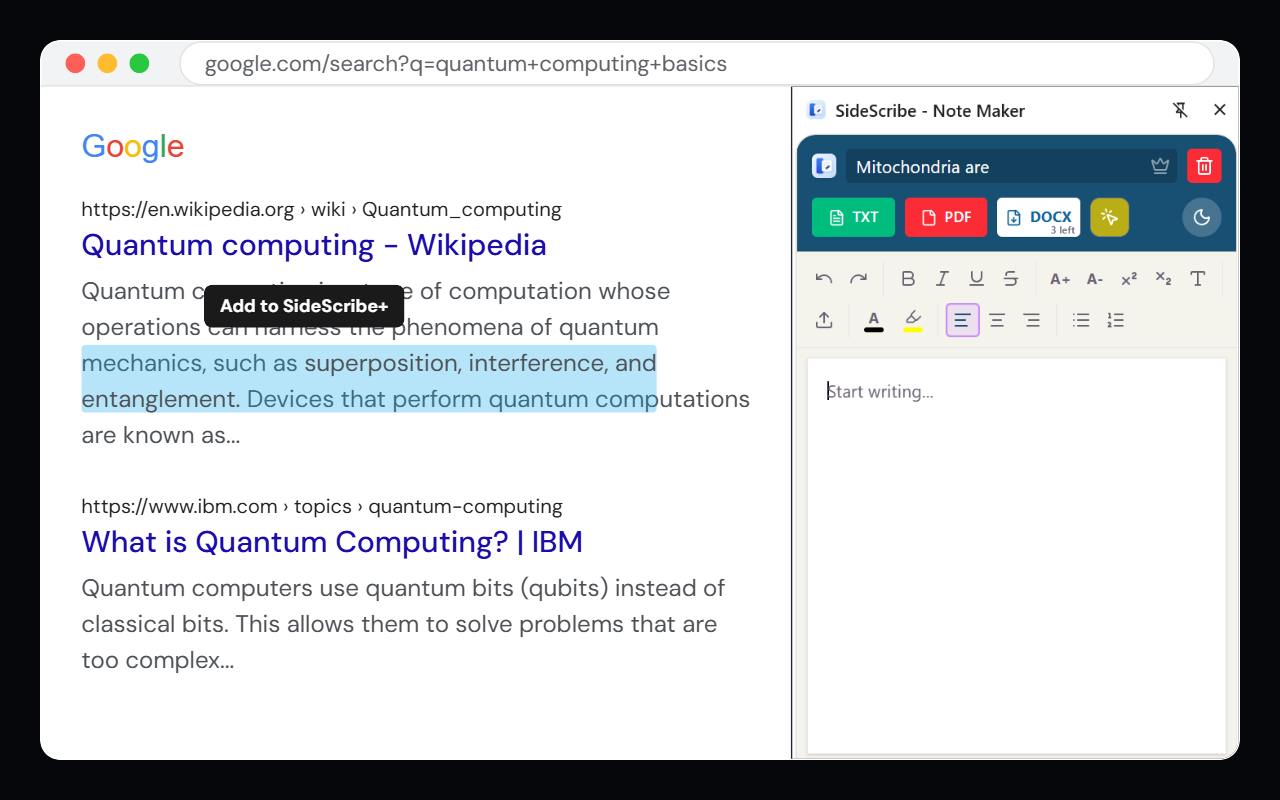
Highlight any text on any website, capture it instantly to your side panel, and export polished DOCX, PDF, or TXT notes — without ever switching tabs.
Watch how effortlessly SideScribe captures and organises your research.
Select any text on any webpage. A floating "Add+" button appears — one click drops it directly into your side panel.
Reorder your captures, add personal notes, or delete what you don't need. Your editor lives right in the browser.
Download a professionally formatted DOCX, PDF, or plain TXT file instantly — ready to share, submit, or archive.
Highlight any text on any site — Wikipedia, news articles, PDFs, research papers — and capture it with a single click.
Smart InsertExport to DOCX with formatted headings, PDF with clean layouts, or TXT for maximum portability. Always polished.
DOCX · PDF · TXTZero data collection. Notes live in your browser's local storage only — never sent to any server, ever.
Local FirstBuilt on Chrome's Manifest V3 Side Panel API. Always accessible, never overlapping your content, blazing fast.
Chrome MV3Mix captured text with your own typed notes. Bold, italics, and basic formatting — no markdown needed.
Built-in EditorPro users get unlimited DOCX and PDF exports, lifetime updates, and priority support. Pay once, use forever.
One-Time PaymentNo subscriptions. No feature gating. Pay once and own it.
Instant unlock · No refunds on digital goods after activation · Support within 7 days
Everything you need to know before purchasing.
We're here to help. Usually respond within 24 hours.